Common stuff so far (I hope).
Common stuff so far (I hope).
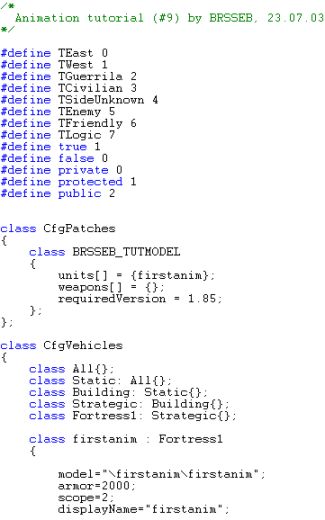
Our house-class (or Fortress in this case, the subclass for houses isnt all that important. Fortress will do just fine) got a model and foldername named firstanim and you`ll find it under Objects->firstanim in the editor once compiled. Note the "requiredVersion" field saying 1.85. Trying to load the addon under older versions will give you a warning message when you start ofp.
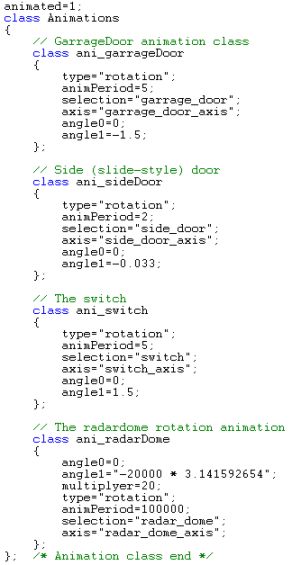
THe animationclass is the most important new stuff here. It defines like what stuff to rotate, the name of the axis to rotate around, how long the animation takes to run and the angle (or amount of movement if you will) in radians to rotate. Each animation is given a class name (like ani_sideDoor) which will later be used to run them.
If you want to run an animation "manually" from the editor, say you want to have the sidedoor slide open, you can put "this animate["ani_sideDoor", 1]" in the objects Init-field in the editor. If you want to start it using, say a trigger, you would name the firstanim object like "ABC" and you could start the animation with "ABC animate["ani_sideDoor",1] (you swap the 1 with 0 to close the door again). Its always a good thing to list all the animation class names in your addons readme file so that advanced mission editors can controll the animations if they will.
If you look closely you will notice that all but the ani_radarDome looks similar to the other classes. The ani_radarDome is unique in this case since the radardome is supposed to spin around forever, not just move a certan degree (like the garragedoor moves from 0 to -1.5 ("-" and "+" in front of the number controll the direction relative to the axis. If you dont bother reversing the axis, you can just swap the positive or negative sign and the door will rotate the other way. 1.5 is in radians and is almost 90 degrees.)
If you study it, you will notice that the radar dome animation settings seem pretty odd. And they sure are! They seem to have an very large angle1 (60000+ in radians) and the animPeriod is set to 100.000. Well, the thruth is that ofp didnt support constant rotating animations (except for some hardcoded onces like the ship class` radar) and with normal settings and a angle1 set at 2*3.14159 (360*), it would just rotate one cycle and then stop. But thanks to some pioneers on the forums, they found a way to break this limit and create a constant spinning animation. Basically by setting the angle1 AND animPeriod to very high, you will force the radar to rotate slowly around the axis multiple times. It wont be forever, but with such a high angle (60.000 radians is ALOT of degrees!) and the time set to 100000 it will most certanly run for hours before it stops, and most people wont ever see it finally stopping.
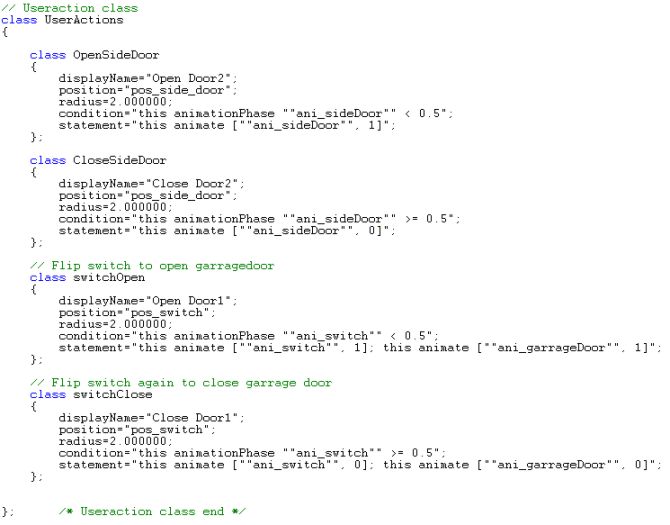
Useraction class in all its glory :)
The UserAction class defines how the player interacts with the animations. We basically want an action appearing on the action menu when we walk close to the side-door or the switch, allowing us to open or close the doors, or pull and push the switch. Note that no seperate action is defined for either the main garrage door or the radar, since the radar will be uncontrollable and the garragedoor will be controlled by the switch.
Lets look at the first class; it is the command for opening the side door (OpenSideDoor). Its display (which shows in the ingame menu) is "Open door2". The position and the radius is the point you must be near (within the radius, which in this case is 2m) for the action to be shown on the menu. Thats why we made those last points in Memory LOD.The condition field tells us that the side door must be half-way closed or closed for the "open door2" command to show up (we dont want to have the open-command display when the door is already open, then we want the close command (below) to be displayed instead). Last, the statement field triggers the animation with the usual "this animate["ani_sideDoor",1]" I told you about before. Note that in configfiles, all nested " signs that are written double "".
Also, you see the switch`s statements fields are also controlling the main garrage door animation by adding a second "this anim...." field operating the garrage door animation.
So that leaves us with a working side door, an animated switch that also operates the main garrage door. But we need one more thing to get the radar animation to start.
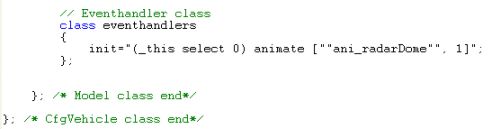
The Eventhandler class is a v1.85+ feature and is quite handy sometimes
The eventhandler is a nice addition to OFP and a small revolution on its own. Basically it checks if certain "events" happen to the addon, like "init" (when the addon is created in missionstart), "engine" (the engine status of the addon), "fired" (when the unit is firing), and some more. It allowed you to execute commands or scripts when these events occur, with the init-command being the most handy of them all since it allowed you to set up features on the addon prior to mission start. In our case, we want to start up the radar animation.
This is done with filling out the init-field with the rather strange-looking variant of the "this animate["ani_radarDome",1] field. Notice that instead of just the normal "this", you have "(_this select 0)" instead. This might seem strange and it sure is. Thrust me, if you dont write it that way in the eventhandler class you will get in trouble. If you use normal "this" in an addon eventhandler, you might get unexpected results, so remember that! (thank you Bratty for this info :) )
Ok, that was the configfile and abit info about animations. Hope you learned some of it and maybe can use this information on your own addons soon. Lets get this structure ingame and see how it all looks like!