Well, we got the dampers working, but ofp isnt quite satisfied yet. It also need to know more about the wheels and how it interacts with the ground. More vertexplacing and selection-naming I am afraid.
There is a total of 8 vertices to place, two for each wheel. But unlike the last page where we placed one in the middle under each wheel, we need one at each wheel edge. Lets move:
- Create a new LOD and change it to Memory LOD.
- In left view zoom in to the front wheel pair, palce cursor right beneath wheel and press "insert" to create a vertex.
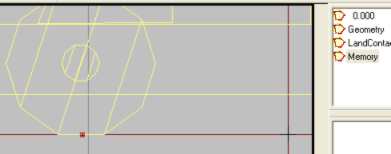
- Go to front view, lock x axis and move the vertex to the inner edge of left front wheel.
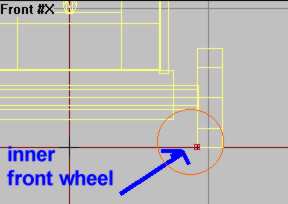
- Now hold down shift, and drag the vertex to the outer wheel edge and a copy should appear there. See pic
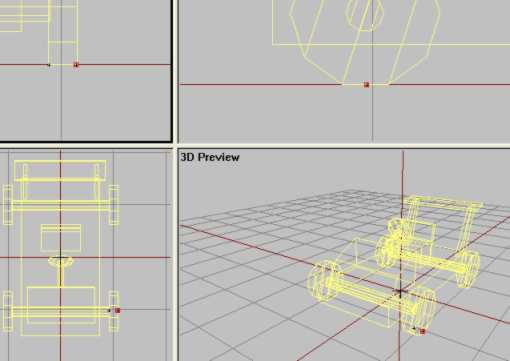
Now a same pair of vertices should be placed under the last 3 wheels. Do this now. Then select each vertex (one by one, not pairs!) and make a save selection for each of them. See picture for all the selection names.
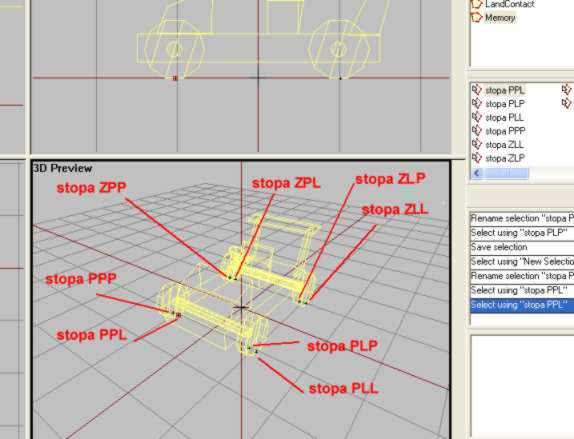
- stopa PLP: Front Left Right marker
- stopa PLL: Front Left left marker
- stopa PPL: Front Right left marker
- stopa PPP: Front Right Right marker
- stopa ZLL: Rear Left Left marker
- stopa ZLP: Rear Left Right marker
- stopa ZPL: Rear right Left marker
- stopa ZPP: Rear right right marker
Now thats done. It is hard work, I know, keeping all the PPLs and ZLL under controll. Dont worry if you screw it up the first time, but keep trying untill you get it right. When done, test if you want and move to next page.
<-Back__Home__Next->