Next one is very important for the phycis model.
For all moving objects, OFP will like to know which parts of the model is in contact with the ground. What we need to do is to place out 4 vertrices, one under each wheel. Then select and name each vertex with more czech gibberish :). Lets move:
- Make a new LOD, it will be called "1.000". Rightclick on it, go to "propeties" and select "LandContact" from the list. Hit OK.
- In left view, zoom in (Alt + right and left mousebutton) and move the cursor just beneath the front set of wheels.
- Then hit "insert" and a new vertex will be created there. See pic below.
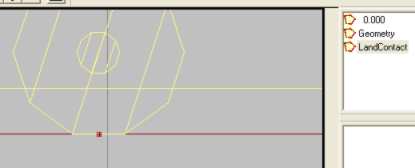
- Now go to front view, lock the x-axis (hit "x"-button) and move the pixel just right under the right front wheel. Should look like this in 3d view:
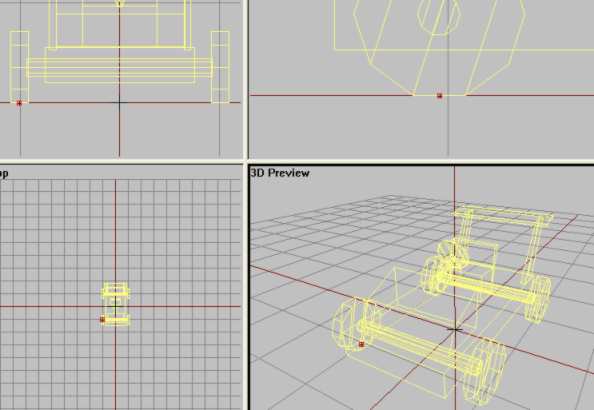
Now you know how to do that. You must place one vertex under each wheel, so use the info above on how to do place the last 3 vertrices. It should look like this afterwards:
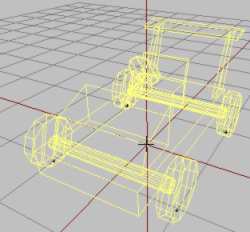
Now we have to do the same thing as the last page, select one at the time and define a selection for it. Select the front right vertex, make a new selection and call it the right name, etc. Here is the selection names:
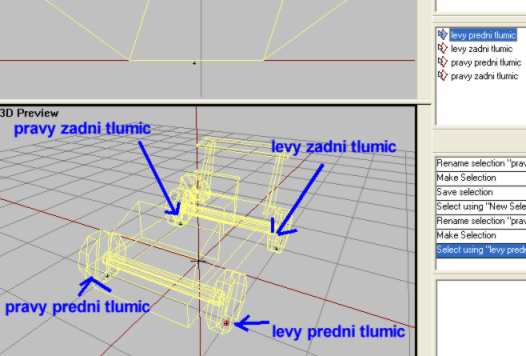
- pravy predni tlumic = right front damper
- levy predni tlumic = left front damper
- pravy zadni tlumic = right back damper
- levy zadni tlumic = left back damper
Done with that. Good. Now things like dampers will work properly and should eventually give you a much more smoother ride. But we arent done yet. Next one then.
<-Back__Home__Next->