|
| [ Community ] |
|
| Registrieren |
| [ Status ] |
5157 registrierte Benutzer.
Online: MCPXXL und 34 Gäste |
| Besucher |
| heute: |
|
373 |
| gestern: |
|
416 |
| gesamt: |
|
2040530 |
|
| [ Link us ] |
|
www.Mapfact.net

|
| [ Links ] |
|
BIS

|
|
BIS Forum

|
|
BIS Wiki

|
|
Morphicon

|
| ArmA Info
 |
|
Armed-Assault.de

|
|
BIS4Players

|
|
AMS

|
|
AMS

|
|
Mission DB

|
|
BW-Mod

|
|
WhiteWolf

|
|
|
|
|
|
| Preview: 3D-Editor (eng) |
[ Overview of the Mammoth Project ]
"3D-Editor" by Silola
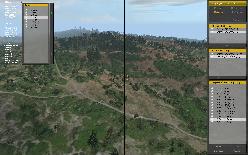
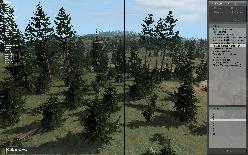
Silola began his work on his new project called "3D-Editor" once the DAC 2.0 had been released. The development on this project is far advanced and the first beta tests have shown a good ability to control, accompanied by a huge level of "fun at work".
But this Editor has nothing to do with a 3D-Missions-Editor as some of you guys might think now. It's rather a special way of object placement and that's the way the Editor has been made for.
The good operability, the structured foundation and a bunch of helpfully functions are becoming this Editor to a welcome tool.
|
 |  |
The special thing is that the files can be saved external. This fact makes this Editor very
fascinating, we think. Objects which are placed with the Editor, will be administrated in Projects. Each project can take a specific number of objects.
One can load a huge number of projects at the same time and one can also switch between all those project without any problems.
Each project can be saved in a external file to load it later again into the 3DE, may be to make some changings or to add something else.
Now it's possible to generate working SQF scripts, which will display the area as it was created in the Editor within a mission. But Silola made an advanced step, so he implemented the possibility to transfer a project into a exportable Visitor script.
Or explained by another way, each project which can be created with the Editor can be transferred to Visitor. To make it work he modified three original Visitor scripts to optimize the import of 3DE projects. |
Features:- Projectwork possible alone or also with some partners
- Unlimited amount of projects can be created and loaded
- Projects can be saved at any time
- Each project can be exported to a SQF-Script or a Visitor-Script
- Easy Camera-Steering (only with the mouse)
- Unlimited object groups can be created
- Marker adjustments for each superior object class
- User defined favorites can be created and saved
- Prefabs can be generated and saved out of objectgroups
- Aspect ratios 5:4 + 16:9 + 16:10 are supported
- Brush-Functions "Create" (Single/Path), "Delete" and "Select"
- Random-Functions (Direction, PosX, PosY, Height, Distance, Object type)
- Replace-Function
- ASL-Function
- Calc-Function
- Automatic Copy-Function
- Snap-Function (BoundingBox)
- Object group-Editing
- Functions "Camera-/Object adjustment"
- Dialog can be hidden
- Moveable Control-Dialog
- Options can be saved
- a lot more.
 |  |
Editorupgrade by Lester
Silola is already supported by Lester who is currently working on a new EditorUpgrade. This Upgrade won't only be enlarged with all Queens Gambit objects, furthermore many objects, i.e. all street objects have been adjusted to the 3DE Format to ensure a optimized handling.
The objects will be named more accurate and a huge number of icons will be replaced by new ones as well. Furthermore ArmA will be adjusted much more through new or edited Objects like
- new signs
- new rocks, walls and a bridge
- new and modified streets and sidewalks
- new plants
- some repaired BIS objects
- one small Building-Kit of diverse objects
- static palettes and barrels
- new lamps
- object selection with a beach and water theme
- a lot of accessoirs to decorate
- sortierte object kategories
- no annoying icons will be displayed on the mission map
- let us see what comes else ...
|
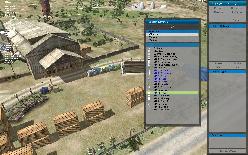 | 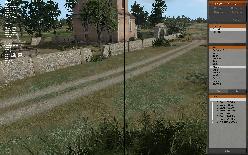 |
3DE - Island by Sgt.Ace & MCPXXL
Finally there is Sgt.Ace, currently working under high pressure on a new “empty” Island, which shall serve as a kind of construction site, so it'll represent the basic version of our prototype Island.
Features :- high resolution satellite texture
- new ground textures
- new clutter objects
- 2 surrounding islands
MCPXXL is a part of the team as well, so for example, he placed the whole road network with 3D Editor. He's also the first person who has to be contacted on for testing of the Editor functions.
It's our target to configure the whole "empty" prototype Island with the 3D-Editor. We can do this in a kind of a Multiplayer session, because the Editor enables us to work in real-time like a normal Multiplayer game. |
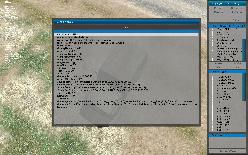 | 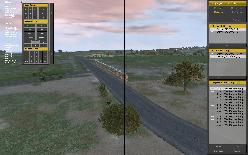 |
Each person is able to take a look on the other members projects, finished projects will simply merged and can be imported into Visitor.
This kind of work separation is pretty new in case of Island Editing, it's also very funny and the growth period of an Island can be rapidly reduced. |
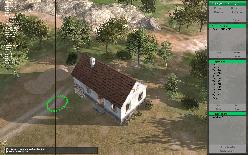
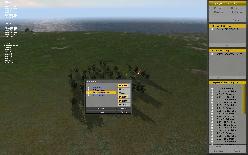
By the way, all screenshots derive from our 3DE-Island. All objects on this island would placed with the 3DE and imported in Visitor. |
We've created a video for you to enable you watching the 3D Editor in action. This video is totally free of any comments but very interesting.
Additionally here is a PDF-file with a short procedural method of project work with the 3DE.
Have fun while watching! Your Mapfact-Team  |
>Download 3DE procedural method of project PDF<
::
|
|
|
|
|
|
|
|
|
|
| Die Website ist für eine Auflösung von 1024 x 768 optimiert / Copyright by Chneemann |
|
Seite in 0.95417 sec generiert
|