We got a nice plane right now, but we can still add some minor details to spice ut up abit. So lets add some features:
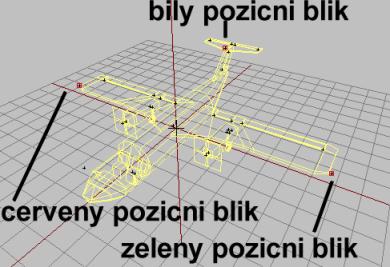
If you did lesson 5, the boat tutorial, you know that lights are easy to make. We just add some named vertrices in Memory lOD. So lets have red and green position lights on the wingtips and a flashing white one at the top of the tail, like most planes do (Or go mad and decorate the plane with lights like a crazy christmas three, your choise ;) ). And a bunch of other smaller details.
- Open the firstplane.p3d again go to memory LOD.
- and insert some vertices on the plane like on picture. Same setup as for the gunboat in lesson 5.
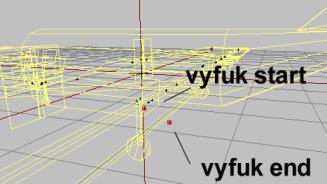
- As for the gunboat, you can also control where the engine smoke is to come out from. Not very important, but nice gadget feature anyway. You place one vertex named "vyfuk start" (vyfuk is the smoke) and one named "vyfuk konec". Doesnt seem like its possible to have a pair of these (since we have two engines), so I just placed them on the left engine.
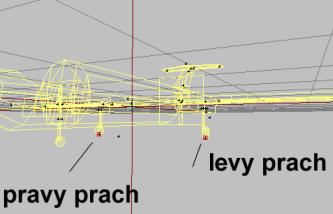
- Furthermore, you can specify directly where the wheel dust is to take place (!). Its by placing a vertex directly beneath the wheels in Memory LOD. We`ll place the pair for the rear set if wheels. The vertex on the left is called "levy prach" and right is called "pravy prach".
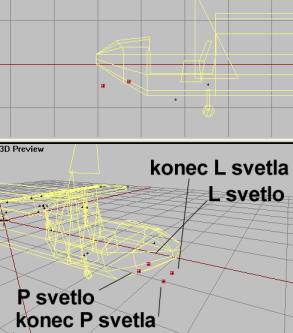
- Would be nice to have some spotlights for night landing, right? Sure it would. We havent modelled spotlights on our model, but nevermind. We`ll do spotlights anyway. In memory LOD, place foru vertices like this at the lower front. Name them as in image. This will create two spotlights that can be turned on or off at night. Makes taxiing easier ;)
Ok, thats enough detail for now, isnt it? One last thing...
Back__Home__Next