Go to memory LOD and zoom in on the gun like before. If you have done lesson 3, you will already be familiar with this but there are some more selection names to learn. We must define the bullet path, define what is the up and down movement axis, and what is the left and right axis.
- Zoom in like this to have a clear picture. Do this in the other views since we will need all four view to position the vertices right.
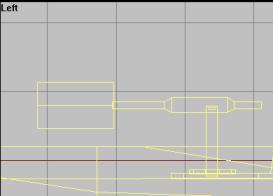
- Using the picture below, place a single vertex and name it "gunnerview". I wont go in detail about this one, but its used to tune how gunner looks in 1st person.
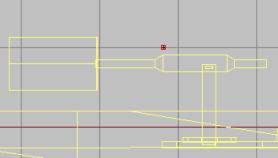
- As with all gun addons, we need to define the gun barrel so that the bullets come out properly.
Insert two vertices (make sure they are strait) and name them the labels on the picture:
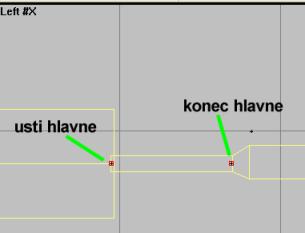
- New we need to define where the gun shoots out the empty cartridges. Its defined in similar manner to the gun barrel, just with different seleciton names. Use topview and sideview to make the two vertices.
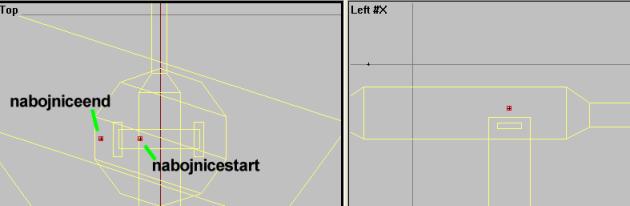
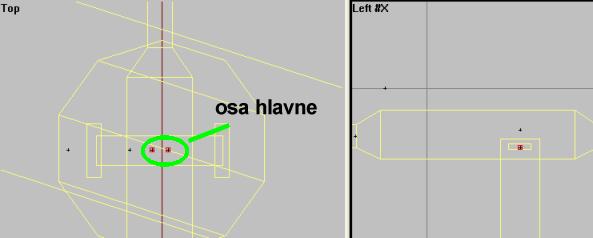
- Then its the axis for the up and down movement. Its just two vertices placed in the spot where we want the gun to turn around. See the picture for details. Make and select the two vertices and call them called "osa hlavne".
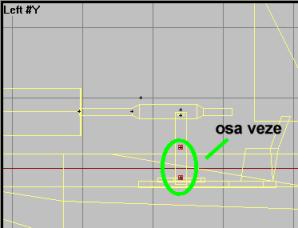
- Then for the axis for the left and right movement. In left view place two vertices right on top of each other (place on and drag-copy one down with y-axis locked to get them properly aligned). Name them "osa veze".
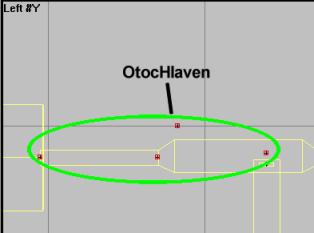
- Now for some reselecting. Select both usti/konec hlavne, both nabojnice-vertices, and the gunnerview vertex. Name all 5 vertices "OtocHlaven".
-
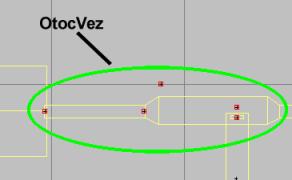
Now, select the same again, but this time also take the two "osa hlavne" vertices with you. Name all 7 vertrices for "OtocVez", like in picture.
Phew, lot of stupid selection names there. Tripplecheck them to make sure they are all right before moving on!
Back__Home__Next