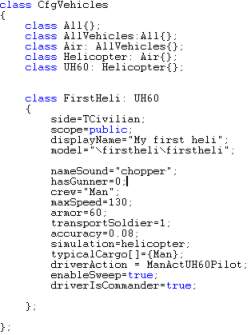
As you can see there are many known features attributes to you here, like the "model=", "transportSoldier" and "displayname" (if not, see lesson 1 and 2). I have used the UH60 class to get the basic features that a chopper have, removed the gunner (hasGunner=0), slowed it down (maxSpeed=130), only one passenger (transportSoldier=1) and made it a civilian aircraft (TCivilian, meaning "Type Civilian). If I had not inherited the Uh60 class, I would have to add much more attributes that would just be confusing right now for the newbie.
Note: This configfile was tested on v1.75 and upwards. To make the heli work properly with 1.46 and lower, you may have to delete the class named CfgModels in the configfile. Just delete that section and you will be fine.
Ok, enough talk. Lets get this thing in the air, then.
Back__Home__Next