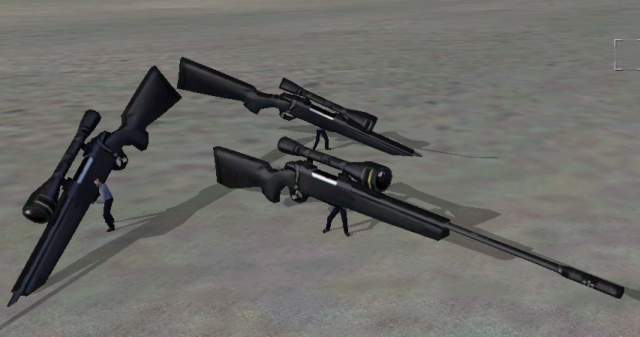
Now THIS would be fun in multiplayer. But its more like "Big Bertha" than "Stalker"....
You`re back, huh? What? Something is wrong, you say? The gun is bigger than an airplane? Like this, for example:
Now THIS would be fun in multiplayer. But its more like "Big Bertha" than "Stalker"....
Well, thats right. Its not scaled right yet. Hey, at least it is pointing in the right direction! And it works, doesnt it? With sound, cartridge shootout, muzzle flash and proper scope? Not bad, eh?
You need to use the 3d scale tool in o2 to make it the right size (remember when scaling to tick on the checkbox "Apply to all LODs" so that the vertices in Memory LOD follows the rest of the model). Normaly this is just trial and error. Scale it down a bit, compile and test it. It it still too big, do the same thing again. Im not sure how big the thing is in real life, maybe the web site can give you a clue. Just remember that each grid square is 1 meter.
One thing you can do to help you, is to "merge" a p3d file of an other sniperrifle, like the M21 or the Dragunov. That will make it easier to scale your own model. Also, it will give you a hint on how the model should be placed to rest nicely in the hands of a soldier. Note that you cant load up the M21 model from your OFP copy since the developers have crypted their files. But they didnt lock up the model files from the first single player demo of OFP. So if you want a p3d model of, say, the M21 sniper rifle, go to my links-page for clues on where p3d`s from the demo can be downloaded.
You can also merge usermade models, other sniper rifles downloaded from the net. Just use PBOTool to unpack them and have a look at their p3d file. When you`re done scaling and moving the gun into position, remember to move both the gun in "0.000" LOD AND the 4 vertrices in Memory LOD). Thats trial and error too, im afraid (if you havent downloaded any demo or unofficial addon p3ds, that is).
Here is how my model looked like in the end. Pretty cool, I think.
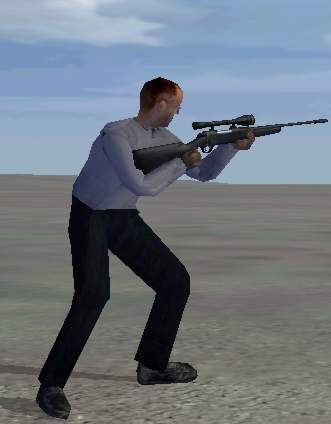
One thing, though. You have noticed that we only have one model LOD, "0.000" in our model. Normaly we have at least 3 different models, one more detailed than the other. This is to compensate for the different hardwaresettings and the distances the model is viewed from. No point in having the machine draw small details, like the heavy-polygon trigger area when the gun is view from a distance far away. This is very important to know if you are to release any addons. Look at other addons and see how its done, because since this is just a simple tutorial Im not going to cover this here. Its not that hard and you should be able to figure this out for yourself.
But now its time for you to feel proud because you just made your first weapon in OFP! As usual, you can download the final model here. And I welcome any feedback on my lesson on hotmail.com (or via MSN directly, I`m online almost every day).