
News / DBR_ONIX's OFP Camera beta V0.4
DBR_ONIX's OFP Camera beta V0.4
A while ago FWATCH (BI Forum Thread) was created by Kegetys, which opened huge scripting posibilities, allowing communication between OFP and external programs, but it has been pretty much unused.
DBR_ONIX’s Working Camera Project is intended to show people what is possible to do using FWATCH, with a fairly basic programming knowlege (A lot of the source code was found via Google).
The documentation (included in zip, along with the compiled EXE, the Visual Basic source and the nessesary Image DLL) details other possible uses, along with uses for this program (without any changes, it allows you to take screenshots triggered by a line of OFP code, which can be anywhere you can run OFP code).
As example of its purpose, it could be used to take a screenshot of a fly over cutscene then set the picture as a texture on a special object.
The only bug with this is that DXDLL’s Printscreen Handling stops this working, so you must disable this via the DXDLL Configurator, I will rework the screenshot code if this is wanted, but really the program isn’t the main point, it’s to get people to use FWATCH.. Comments/Questions/Ideas to this thread.
Using a combination of Visual Basic, FWATCH’s scripting additons and the power of bordum, I’ve put together the first (Proof of concept) version of “OFPCamera”.
To use:
- Start the EXE (Can be at any time, before you launch OFP, or during the mission, whenever, as long as it’s before you want to take a photo, obviously..).
- Start Flashpoint USING FWATCH. If you don’t, it will not work :;):
- Load the demo mission (I will incorporate the scripts into a unit with a camera in the next version)
- Press the H key, and it takes a screenshot, saving it into C:\ScreenShots. One bmp, called _bmp_0.bmp, and a jpg, called 0.jpg
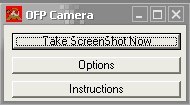
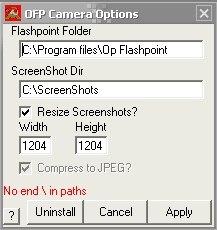
Source: DBR_ONIX